
Download TFTP – TFTP client, TFTP server, network device firmware update, PXE boot, DHCP server, SNTP server, Syslog server, network utility, firmware transfer, lightweight file transfer
Overview
TFTP, a lightweight and efficient network utility, serves as both a client and server for the Trivial File Transfer Protocol (TFTP). Designed for technical users managing network infrastructure, it enables seamless firmware updates for devices such as routers, switches, IP phones, and other embedded systems. The application supports PXE (Preboot Execution Environment) booting, allowing remote system startup over a network—a critical capability in enterprise and IT environments. TFTP's streamlined architecture eliminates unnecessary complexity, making it ideal for scenarios requiring rapid, reliable file transfers without the overhead of traditional FTP.
It is particularly useful for system administrators, network engineers, and IT professionals who frequently deploy firmware updates or configure network boot environments. By offering configurable parameters such as block size, transfer timeout, and file size limits, TFTP optimizes performance based on network conditions. Although the developer did not provide additional technical details about the app’s origin or development history, its functionality aligns with standard TFTP implementations used in industrial and enterprise settings. The application is designed to be lightweight, with a file size of just 2.5 MB, ensuring quick deployment and minimal system impact.
Real-world use cases include automated firmware rollouts across multiple devices, setting up PXE boot servers for OS deployment, and supporting network boot processes in large-scale IT environments. Its ability to operate as a Windows service further enhances its utility by enabling background operation without user intervention. In the broader context of network management tools, TFTP fills a vital niche by providing a simple yet powerful solution for reliable, low-overhead file transfers.
Key Features & Functionality
- Client/Server Dual Mode – Functions as both a TFTP client and server, allowing bidirectional file transfers between devices and computers. This dual capability supports firmware updates from a central server and file retrieval from remote devices.
- PXE Boot Support – Enables remote system startup using the Preboot Execution Environment, streamlining OS deployment and system provisioning across large networks.
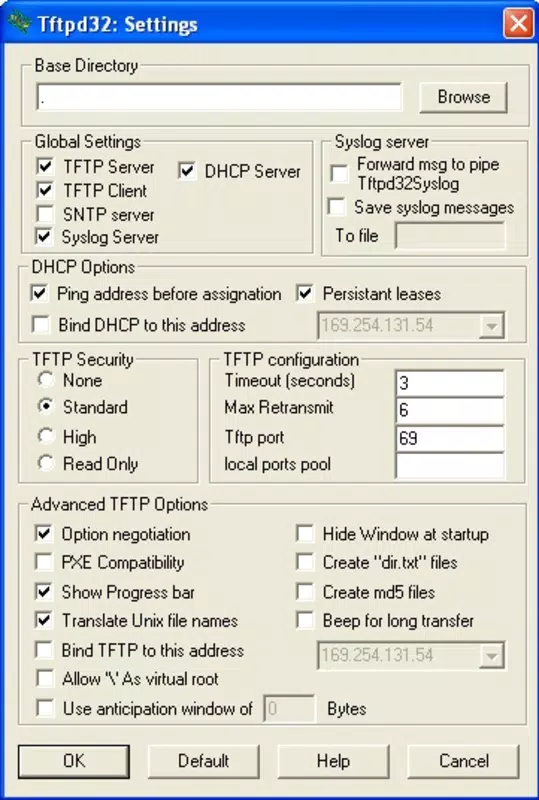
- Configurable Transfer Parameters – Users can adjust block size, timeout duration, and file size limits to optimize transfer speed and reliability under varying network conditions.
- Windows Service Integration – Can be installed and run as a Windows service, ensuring continuous availability and automatic startup without requiring user login.
- Lightweight Architecture – With a minimal footprint of 2.5 MB, TFTP consumes minimal system resources, making it suitable for deployment on servers and workstations with limited capacity.
- Support for Network Protocols – Acts as a server for DHCP, SNTP, and Syslog protocols, extending its utility beyond file transfer to broader network management tasks.
For example, a network administrator can use TFTP to push firmware updates to dozens of IP phones simultaneously by configuring the server with the correct image files and network settings. Similarly, during a system migration, IT teams can leverage PXE booting via TFTP to deploy operating systems across multiple machines without physical media. The ability to fine-tune transfer parameters ensures stable performance even on congested or low-bandwidth networks. These features collectively make TFTP a reliable tool for automation and maintenance in professional network environments.
Interface, UX & Performance
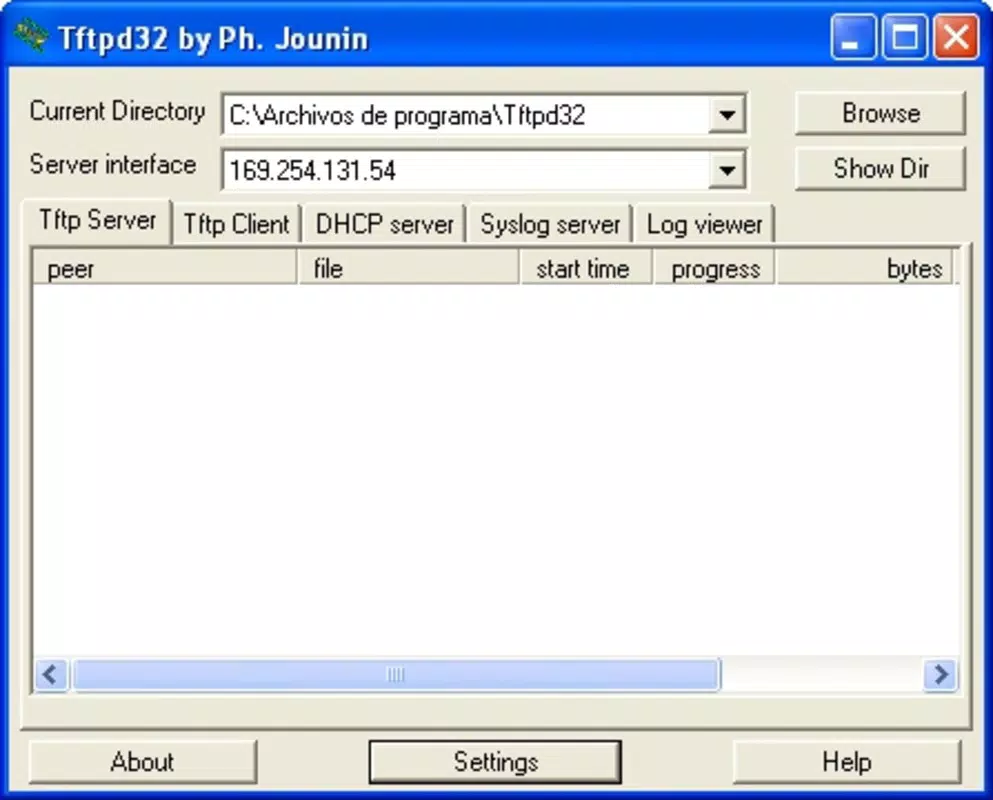
The user interface of TFTP is designed with functionality over aesthetics, reflecting its role as a utility tool for technical users. The layout is straightforward, with clear sections for server configuration, client operations, and protocol settings. Navigation is linear and intuitive, allowing experienced users to quickly access essential functions such as starting the server, selecting file directories, and adjusting transfer parameters.
Although the developer did not list formal performance metrics, the application’s lightweight nature suggests efficient operation on a range of Windows systems. It is optimized for background tasks, with minimal CPU and memory usage during active transfers. Responsiveness is consistent, particularly when handling small to medium-sized files typical in firmware updates. Stability is maintained across extended sessions, especially when running as a Windows service.
Performance may vary depending on network conditions and system configuration, but the app’s design prioritizes reliability over speed enhancements. Users can expect consistent behavior during repeated operations, such as automated firmware deployments. The lack of graphical complexity reduces the risk of interface lag or crashes. Overall, TFTP delivers a stable, predictable experience tailored to the needs of network professionals who value functionality and dependability over visual polish.
Platform Compatibility & Technical Requirements
TFTP is available exclusively for the Windows platform. It is compatible with modern Windows operating systems, though specific OS versions were not listed by the developer. The application has a file size of 2.5 MB, indicating a minimal installation footprint suitable for both desktop and server environments.
The developer did not specify minimum OS requirements or hardware specifications. However, given its lightweight nature and service-based architecture, it is likely compatible with Windows 10, Windows 11, and Windows Server editions. Compatibility with older versions such as Windows 7 or 8 was not confirmed. Users should ensure their system supports running background services and has network access permissions to operate TFTP effectively.
Installation is straightforward, with no complex dependencies reported. The app can be installed and configured without requiring elevated privileges in most cases, although administrative rights may be needed to run it as a Windows service. The absence of detailed system requirements suggests a broad compatibility range, but users are advised to test the application in their specific environment before deployment.
Pros and Cons
Pros
- Lightweight and efficient with a minimal 2.5 MB file size
- Supports both TFTP client and server functionality
- Enables PXE boot for remote system startup
- Configurable transfer settings for optimal performance
- Can run as a Windows service for uninterrupted operation
- Supports additional network protocols (DHCP, SNTP, Syslog)
Cons
- Platform limited to Windows; no support for Android or iOS
- Developer did not provide detailed system requirements
- No built-in logging or monitoring features reported
- Interface is functional but lacks modern visual design
- Not suitable for non-technical users due to advanced configuration needs
FAQ
Is TFTP free to download and use?
Yes, TFTP is available at no cost. The application is distributed free of charge, making it accessible for both personal and professional use.
Can TFTP be used on Android or iOS devices?
Based on current information, TFTP is only available for Windows. There is no official support for Android or iOS platforms.
Does TFTP require administrative privileges?
While basic operation may not require admin rights, running TFTP as a Windows service typically requires elevated permissions. Users should ensure they have appropriate access rights.
How do I install TFTP as a Windows service?
The application can be configured to run as a Windows service during installation. Specific setup steps are not detailed in the provided information, but the option is available through the application’s configuration interface.
Is TFTP secure for transferring sensitive firmware files?
TFTP does not include encryption or authentication features, so it is not inherently secure for transferring sensitive data. It is recommended to use TFTP only on trusted, isolated networks.
Final Thoughts
TFTP stands out as a specialized yet powerful tool for IT professionals managing network devices and firmware deployments. Its dual client/server functionality, combined with PXE boot support and configurable performance settings, makes it an essential utility in enterprise and technical environments. The ability to run as a Windows service ensures continuous availability, while its lightweight design minimizes system impact.
While not suited for general consumers, TFTP delivers significant value to network administrators, system engineers, and IT teams responsible for maintaining and provisioning network infrastructure. Its role in automating firmware updates and enabling remote boot processes enhances productivity and reduces manual intervention.
For those working with routers, IP phones, or large-scale deployments, TFTP offers a reliable, efficient solution. Despite its minimal interface and lack of modern features, its core functionality remains robust and purpose-built.
Download TFTP now


